Tourist: AI Trip Planner
- 0.0
- Rating
- 10.00K
- Installs
- Free
- Price

 Analysis by App-foxy
I approached Tourist: AI Trip Planner as the kind of travel app you open when a destination sounds exciting but the planning already feels tiring. Its focus is practical: helping me explore places, shape a trip into an itinerary, and keep travel ideas in one place instead of scattering them across browser tabs, notes, screenshots, and chat messages. Developed by Tourist: Travel the World, it sits in the Travel & Local category and is available as a free app for everyone.
After using it as a planning companion rather than treating it like a complete travel agency, I found its main appeal easy to understand. It is most useful during the messy middle stage of a trip: I know where I want to go, but I have not yet decided what belongs on each day, how much movement is sensible, or which discoveries are worth saving. The app gives that stage some structure without demanding that I already have a perfect plan.
How Tourist feels in its current form
The current release is version 6.1.1, and that matters because this is not an abandoned concept left in an early prototype state. The product has had time to develop around its central promise of trip planning, destination discovery, itinerary creation, and sharing experiences. I still see it as a focused planning tool rather than a replacement for every travel service I might need.
You May Also Like

 AccuWeather: Weather Radar
AccuWeather Review: A Quick, Clear Forecast for Everyday Decisions
For everyday plans, the best forecast is the one you can understand quickly. AccuWeather makes rain timing, radar, and local conditions easy to act on, with a few trade-offs.

 Hill Climb Racing
Why Hill Climb Racing Still Turns Crashes Into One More Run
A tiny car, a bumpy hill and one more upgrade: Hill Climb Racing keeps resurfacing because its simple chaos makes every near-miss feel personal.

 AliExpress - Shopping App
AliExpress Makes Global Shopping Feel Personal, but Shoppers Bear the Risk
AliExpress turns a global marketplace into a pocket-sized discovery engine. Its reach is useful, its shopping loop compelling, and its trade-offs easy to miss.

 Lords Mobile: Kingdom Wars
Lords Mobile Is a Kingdom-Building Routine, Not a Quick Match
A case-by-case verdict on the building, battles, device demands, and social commitments that make Lords Mobile rewarding for some players and exhausting for others.

 PDF Scanner app - TapScanner
TapScanner Makes Paperwork Easier to Capture, Check, and Share
TapScanner makes scanning with a phone feel less like a rescue operation and more like a dependable step in getting work done. Its capture tools are useful, though not flawless.

 Block Blast!
Block Blast! Shows How Much a Puzzle Game Can Leave Out
A quiet grid game shows why puzzle players increasingly value instant clarity, repeatable skill and low-pressure play—and where the genre still needs to catch up.
More From Our News Desk
View All News


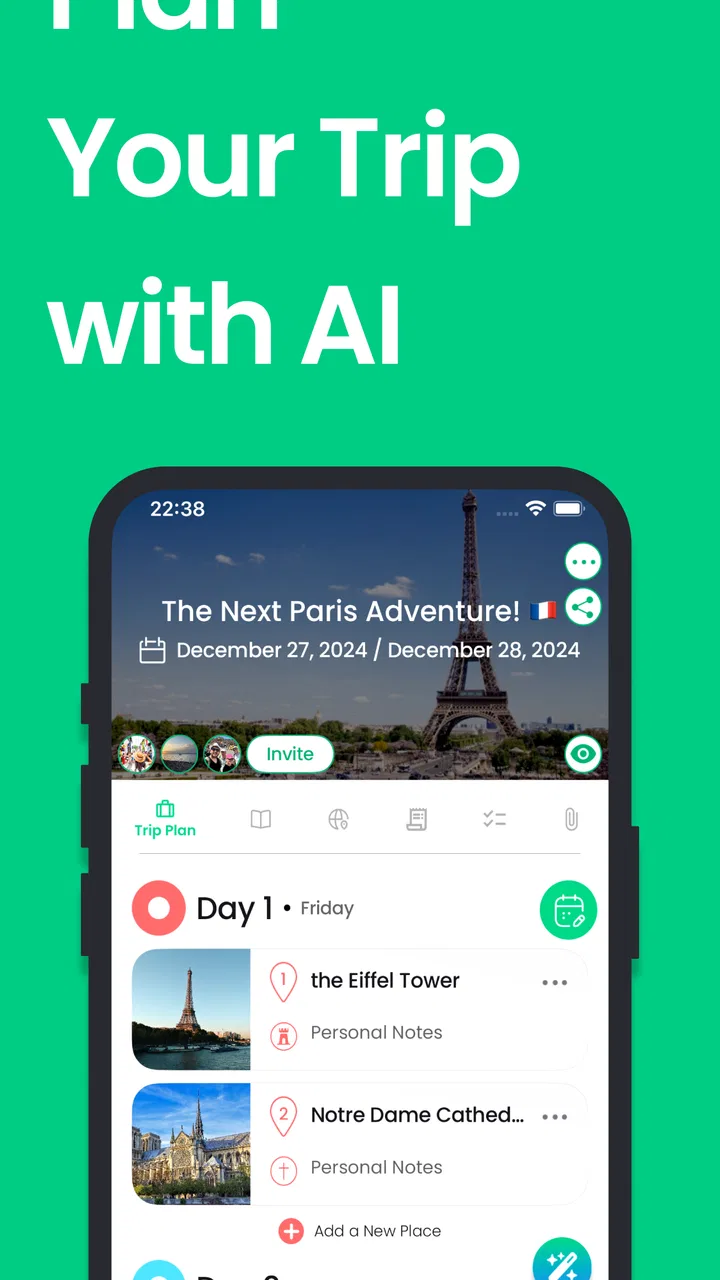
The first thing I liked was the way the app encourages me to think in terms of a journey instead of isolated attractions. A normal search engine is excellent when I already know what I want to find, such as a museum or a restaurant. Tourist is more helpful when my question is broader: what could make a short visit feel coherent, and how can I turn several interesting ideas into a day that is actually manageable?
That distinction is important. The app does not become valuable simply because it can show destinations. Its real usefulness appears when I move from browsing to arranging. I can start with a place that interests me, collect possibilities, and gradually turn those possibilities into a plan I can discuss with someone else. That is a more realistic travel workflow than expecting a single search result to solve a whole holiday.
For a first-time visitor, the experience can reduce the blank-page problem. Instead of beginning with a spreadsheet and trying to remember every place mentioned in articles or videos, I can use the app as a working shortlist. I would not blindly follow every suggestion, but I appreciate having a visual planning space where rough ideas can become a sequence.
Where the app is strongest
The strongest part is the transition from inspiration to an itinerary. Many travel apps are good at one side of that process. Booking tools handle reservations, map apps handle directions, and social platforms provide endless recommendations. Tourist is aimed at the connective tissue between those tasks: deciding what I want to do and organizing it before I worry about the final logistics.
I found that especially useful for trips with several people. A group often has different priorities, and a shared plan gives everyone something concrete to react to. Someone can prefer landmarks, another person can look for food or neighborhoods, and the itinerary becomes a place to negotiate rather than a vague conversation full of “we should probably visit that.”
There is also value in keeping the plan flexible. I prefer building a loose outline rather than filling every hour. A useful approach is to assign one or two important activities to a day, then leave room around them for wandering, meals, weather changes, and unexpected discoveries. Tourist works better for that style than a rigid schedule that assumes every transfer will be effortless.
Another less obvious benefit is psychological: saving an idea makes it less likely that I will forget why it appealed to me. When planning over several evenings, I often collect places at different times and in different moods. A dedicated trip workspace helps preserve that context, so I can return later and decide whether an attraction still fits the route instead of starting research from zero.
What the recent version means in practice
The move to version 6.1.1 suggests an established product that has progressed beyond its earliest form, but I would be careful not to read that number as a promise of a particular feature set. What I can judge today is the overall direction: Tourist remains centered on making travel planning easier, helping users discover destinations, and turning those discoveries into shareable itineraries.
For existing users, the practical effect of using a current release is that the app should be evaluated as a maintained planning experience rather than as a one-time novelty. That makes it more suitable for someone who plans several trips over time. I can imagine returning to the same workflow for a weekend away, a family visit, or a longer holiday, adjusting the level of detail depending on the trip.
At the same time, version information should not be confused with a guarantee that every personal planning preference has been solved. A newer release can improve the foundation without eliminating the need for judgment. I still have to check opening hours, transport connections, reservation requirements, accessibility details, and local conditions through appropriate sources before treating an itinerary as final.
That is one of the key trade-offs. Tourist can help me decide what belongs in a plan, but it should not be my only source for time-sensitive travel facts. If an activity depends on a precise departure, a ticket window, or a seasonal schedule, I would verify it separately. The app is most convincing as the place where I shape the trip, not necessarily the final authority for every operational detail.
A realistic weekend planning routine
Imagine I am arranging a two-day city break with a friend. On the first evening, I use Tourist to explore the destination and save places that match our interests. I do not try to build the perfect route immediately. Instead, I separate “must see” ideas from “would be nice” ideas, because that prevents the itinerary from becoming a list of obligations.
On the second pass, I group the saved possibilities into sensible days. I look for a natural rhythm: a major activity, nearby discoveries, a meal break, and enough empty space to avoid rushing. This is where the app is more useful than a collection of bookmarks. The question changes from “is this place interesting?” to “does this place fit with the rest of the day?”
Before sharing the plan, I would remove anything that creates unnecessary pressure. A common mistake is to treat every saved idea as a commitment. Tourist makes collecting easy, so I have to provide the editing discipline myself. Keeping the itinerary selective is a better use of the app than trying to prove how many attractions can fit into a short visit.
Finally, I share the outline with my travel companion and ask for reactions to the sequence, not just the individual places. That distinction often reveals the real problem. A friend may like every attraction but dislike the amount of walking between them. A shared itinerary makes that friction visible early, when it is still easy to change.
Sharing is useful, but it changes the planning style
The sharing element is not just a social extra. It affects how I plan because it encourages me to make the itinerary understandable to another person. A private list can be messy and full of half-formed thoughts. A shared plan benefits from clear priorities, realistic pacing, and fewer duplicates.
I would use this for couples, families, and small groups who want a common reference point. It can also help when one person does most of the research but does not want to become the permanent guide. Sharing the plan gives others a chance to contribute and makes the final schedule feel more jointly owned.
There is a limitation, though. Collaboration does not automatically settle disagreements. If one traveler wants a packed sightseeing schedule and another wants slow mornings, the app can display the conflict but cannot make the compromise. My advice is to use the itinerary as a conversation tool: mark the essentials, identify optional stops, and agree in advance on which parts can be dropped.
Who should use it, and who may prefer another tool
I think Tourist is a good match for travelers who enjoy discovering options but dislike organizing them manually. It is particularly appealing if I am planning a destination I do not know well, coordinating with another person, or trying to turn scattered inspiration into a realistic outline. The free entry point also makes it easy to test the workflow before deciding whether it deserves a regular place in my travel routine.
It is less suitable for someone who only needs turn-by-turn navigation. If my entire requirement is to get from one address to another while already on the road, a dedicated maps app will usually be faster and more direct. Likewise, a booking platform remains the better choice when my priority is comparing rooms, flights, or reservations rather than shaping the experience around them.
I would also hesitate to recommend it as the sole tool for highly technical travel. Trips involving multiple transport changes, strict timing, remote areas, or complex accessibility requirements need more verification than an itinerary planner alone can provide. In those situations, I would combine Tourist with official transport information, reservation services, and map tools.
Travelers who already maintain a detailed spreadsheet may not gain much from switching. The advantage here is convenience and discovery, not unlimited customization. If I need formulas, budget accounting, extensive notes, or a precise operational checklist, a spreadsheet or dedicated project tool may remain better. Tourist earns its place when visual organization and destination inspiration matter more than granular control.
Costs, platform fit, and everyday friction
The app is free to download, with in-app purchases ranging from $0.99 to $104.99 per item. That wide range means I would pay attention to what any optional purchase unlocks before committing, especially if I am only planning one short trip. The free starting point is helpful, but the presence of purchases means the complete experience may not be identical for every user.
Its content rating is Everyone, so the presentation is positioned for a broad audience rather than a narrowly adult travel niche. I see that as a good fit for family planning, although parents should still make their own decisions about which destinations and activities are appropriate for their particular trip.
The listed minimum operating system is version 12, which is worth checking before installing on an older device. On a compatible phone, I would still plan for practical issues that affect any travel app: battery use, connectivity, and the need to keep important reservations available through another method. I never want an itinerary to be the only copy of a critical booking or address.
The developer is Tourist: Travel the World, and the app has passed the early discovery stage with over ten thousand installs. That gives me some confidence that the concept has found an audience, while also reminding me that it is a more specialized choice than the giant map and booking platforms most travelers already know.
Three planning habits that make it more useful
My first tip is to create the itinerary in two layers. The first layer contains fixed commitments or genuine priorities. The second contains flexible discoveries that can move, shrink, or disappear. This prevents the attractive browsing side of the app from turning into an exhausting schedule.
My second tip is to review the plan from the perspective of energy, not only distance. A route may look efficient on a map but still be tiring after a long flight, a late arrival, or a morning with children. I use the app to arrange the ideas, then I deliberately leave recovery time around the busiest parts of the trip.
My third tip is to share earlier than feels necessary. Waiting until the itinerary looks polished can create avoidable disagreement. Sharing a rough version lets other travelers object to the pace, priorities, or balance before I become attached to the arrangement. That makes the collaboration feature more valuable than using it merely to announce a finished plan.
A fourth useful habit is to separate discovery from verification. I let Tourist help me find and organize possibilities, then I check the details that can change: availability, hours, ticket rules, closures, and transport. This division of labor keeps the app in the role where it performs best and reduces the risk of treating an appealing idea as a guaranteed activity.
Remaining gaps I would keep in mind
The biggest gap is the boundary between an attractive itinerary and a dependable travel operation. Planning a day is not the same as confirming every condition that makes the day possible. I still need external checks, and that extra step may disappoint anyone hoping for a single app that handles discovery, scheduling, booking, navigation, and live changes equally well.
There is also a balance between simplicity and control. Tourist feels approachable because it does not force me to begin with a complicated travel database. However, travelers who want detailed budgets, extensive custom fields, minute-by-minute timing, or specialized transport planning may eventually reach the limits of a lighter planning workflow.
The app can organize choices, but it cannot know my real tolerance for crowds, walking, queues, early starts, or spontaneous changes unless I apply that knowledge myself. That is not a flaw unique to Tourist, but it is an important expectation to set. The quality of the result depends partly on how honestly I plan for the people taking the trip.
What I would watch before relying on it for every trip
If I continued using Tourist, I would watch how consistently it supports repeat planning across different types of journeys. A weekend city break tests discovery and itinerary building. A family holiday tests sharing and flexibility. A more complicated multi-stop trip tests whether the planning flow remains clear when the number of decisions grows.
I would also pay attention to how optional purchases affect the practical workflow. Since the app is free but includes in-app items, the important question for me is not simply whether purchases exist; it is whether the free experience remains useful for the kind of trip I normally plan. I would make that judgment after trying a real itinerary rather than assuming the most expensive option is necessary.
My overall view is positive but deliberately grounded. Tourist: AI Trip Planner is a thoughtful choice for turning travel inspiration into a shared, editable plan. It is not the tool I would use for every booking or every live travel emergency, and I would verify important details elsewhere. But when I am staring at a destination with too many possibilities and no clear structure, it gives me a practical starting point.
For me, the best reason to keep it installed is not that it promises to remove every decision. It helps me make better decisions in the right order: discover first, organize second, discuss the plan, and verify the details before departure. If that is the part of travel preparation that usually overwhelms you, this app is worth trying as a planning workspace rather than treating it as your entire travel toolkit.
FAQs for Tourist: AI Trip Planner
01What is Tourist: AI Trip Planner and what can it do?
Tourist: AI Trip Planner is designed to help you organize trips using artificial intelligence. You can enter a destination, travel dates, interests, budget preferences, and other details to receive suggested itineraries and activity ideas. It is useful for getting a starting plan quickly, although recommendations should still be checked against opening hours, local conditions, transportation changes, and your own travel priorities.
02Can Tourist create a complete itinerary for my trip?
The app can generate a day-by-day travel plan based on the information you provide, including possible attractions, restaurants, activities, and sightseeing routes. However, the itinerary should be treated as a flexible suggestion rather than a confirmed schedule. Travel times, reservations, weather, attraction availability, and personal pace may require adjustments before and during your trip.
03Does Tourist: AI Trip Planner work offline?
Some trip information may remain accessible after it has been generated or saved, but you should not assume that every feature works without an internet connection. AI planning, updated recommendations, maps, searches, and live travel information may require mobile data or Wi-Fi. Before leaving, save important details and download any available offline content, while keeping another source of essential travel information.
04Is Tourist: AI Trip Planner free to download and use?
The application may be available to download at no initial cost, but certain features can depend on in-app purchases, subscriptions, usage limits, or premium access. The exact offer can vary by platform, region, and app version. Check the store listing and the subscription screen carefully before confirming payment, especially if you only need the app for one trip.
05How reliable are the AI recommendations in Tourist?
The app can be helpful for brainstorming destinations and building a convenient first itinerary, but AI-generated suggestions are not guaranteed to be accurate, current, or suitable for every traveler. Verify addresses, prices, opening hours, transport routes, visa requirements, safety guidance, and booking availability through official sources. Avoid relying on the app alone for critical travel decisions.
Pros
- Creates personalized itineraries based on destinations
- dates
- and interests.
- Helps organize attractions
- activities
- and travel ideas in one place.
- Useful for discovering less obvious places beyond typical tourist highlights.
- Can reduce planning time when arranging multi-day trips.
- Provides inspiration when you are unsure where to go or what to do.
Cons
- AI suggestions may include closed venues or outdated opening information.
- Generated routes may overlook realistic travel times and local traffic.
- Some advanced planning features may require an account or paid access.
- Recommendations can feel generic for travelers with highly specific tastes.
- It should not replace checking visas
- safety advice
- or official travel rules.

Tourist: AI Trip Planner
Gallery